Why Is My Email Not Sending? 7 Proven Fixes That Work
Why is my email not sending was the question I kept asking myself watching an important message sit stuck in my outbox, the send button clicked multiple times with absolutely nothing happening. After dealing with this across different email platforms, I found this is one of those problems where the cause is almost always something small and quickly fixable, rather than a sign your account is broken.
Here’s what’s actually behind it.
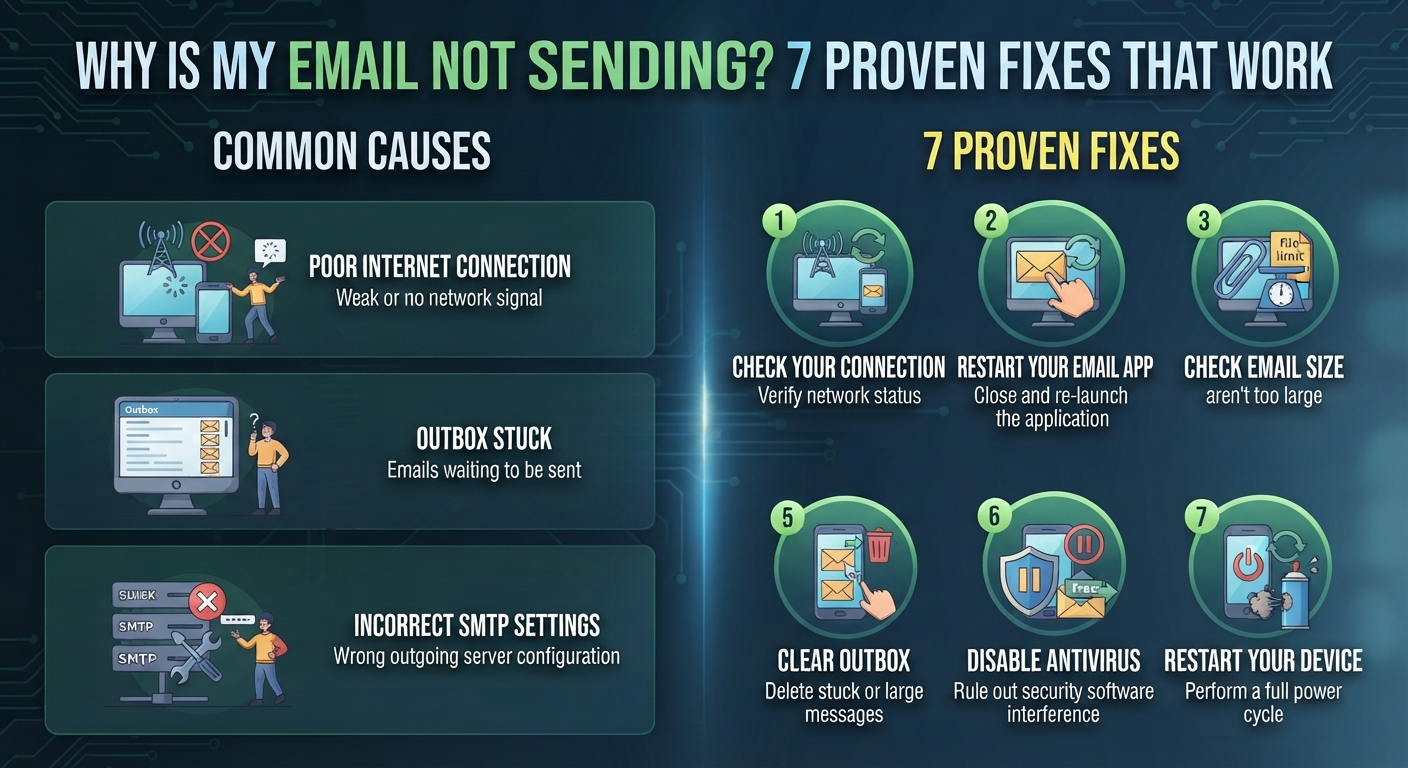
A Weak or Unstable Internet Connection
This is, by a wide margin, the most common reason why is my email not sending. Sending an email requires a stable connection to upload the message and any attachments to your email provider’s servers, and even a brief connection drop can cause the send process to fail or hang indefinitely.
Fix: Check that you’re connected to a stable WiFi or mobile network, and try switching networks temporarily (WiFi to mobile data, or vice versa) to rule out a connection-specific issue.
Attachments That Are Too Large
Most email providers enforce attachment size limits, typically around 25MB for services like Gmail. This is a frequent answer to why is my email not sending, particularly when attaching multiple photos, videos, or large documents without realizing the combined size exceeds the limit.
Fix: Check the total size of your attachments, and if they exceed your provider’s limit, use a cloud storage link (Google Drive, Dropbox, OneDrive) instead of attaching files directly.
Incorrect Recipient Email Address
A simple typo in the recipient’s email address can cause the message to fail or bounce back, especially if the domain portion is misspelled. This is a surprisingly common explanation for why is my email not sending successfully, even though the email appears to send from your end initially.
Fix: Double-check the recipient address carefully, paying close attention to the domain after the @ symbol, since a single incorrect character prevents delivery entirely.
Outdated Email App or Browser
Using an outdated version of your email app, or an outdated web browser if accessing email through a browser, can cause sending failures due to compatibility issues with updated server requirements.
Fix: Check for and install pending updates for your email app, or try accessing your email through a different, updated browser to see if the issue persists.
If your computer feels sluggish overall, not just with email, our guide on why is my computer running so slow covers broader performance issues.
Server Issues on the Email Provider’s End
Sometimes why is my email not sending has nothing to do with anything you’ve done — email providers occasionally experience temporary server outages or slowdowns affecting sending capability across their entire platform.
How to check: Search online for your email provider’s current status page or recent outage reports, since widespread issues are often reported quickly by other affected users.
Account Storage Has Reached Its Limit
Many email providers require available storage space to process outgoing messages, and if your account has reached its storage limit, this can prevent new emails from sending until space is freed up.
Fix: Check your account’s storage usage in settings, and delete old emails, particularly large attachments, or empty your trash and spam folders to free up space.
Security Software Blocking the Email Client
Overly aggressive antivirus or firewall settings can sometimes interfere with email clients, particularly desktop applications like Outlook, blocking outgoing connections without any clear error message explaining why.
Fix: Temporarily check your security software settings for any rules blocking your email application, or consult your antivirus provider’s documentation for known email client conflicts.
Quick Diagnostic Order
- Check your internet connection stability
- Confirm attachment sizes are within your provider’s limits
- Double-check the recipient’s email address for typos
- Update your email app or try a different browser
- Check if your email provider is experiencing a known outage
- Review your account storage usage
- Check security software for any blocking rules
Working through this list in order resolves why is my email not sending for the vast majority of users without needing to contact technical support.
Final Thoughts
Why is my email not sending almost always comes down to something straightforward — a connection issue, an oversized attachment, or a simple typo in the recipient’s address — rather than a deeper account problem. Start with your internet connection and attachment size, since these two factors resolve the issue for most people before any further troubleshooting becomes necessary.
For official troubleshooting guidance, Google’s Gmail support page offers helpful step-by-step resources.
FAQs
Q: Why does my email say “sending” but never actually sends?
This typically points to a connection issue or an oversized attachment causing the upload process to stall indefinitely without completing.
Q: Can a full inbox prevent me from sending emails?
Yes, once your account reaches its storage limit, many providers restrict both receiving and sending new messages until space is freed up.
Q: Should I resend an email if it fails the first time?
It’s generally fine to try again after checking your connection and attachment size, though if it fails repeatedly, checking your provider’s status page is a better next step than repeatedly resending.